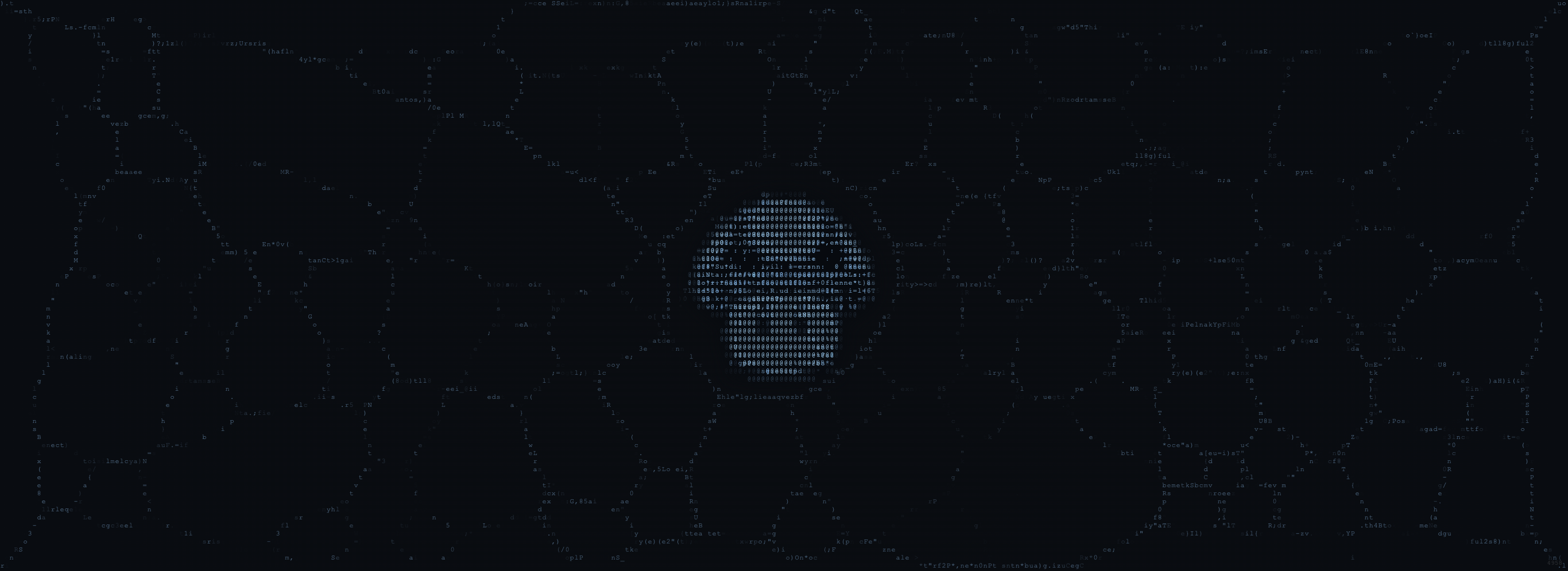
What It Does
The Stencil runs two simultaneous physarum simulations:- Background network: A full-viewport swarm that fills the canvas behind the mascot
- Mascot physarum: A second swarm constrained to the mascot’s shape via edge detection and density mapping
Formation Modes
The Stencil offers four formation modes, selected via buttons in the top-right corner (or keys 1–4). Each mode changes how the mascot physarum is rendered.Mode 1: Ramp (Default)
ASCII art rendering. Trail intensity maps to a character ramp (·:;=+*#%@). Low density gets dots, high density gets dense characters. The result pulses with brightness oscillation. This is the default Shumi stencil look.
Mode 2: Code
Similar to Ramp, but uses a code-like character set. Gives the mascot a “source code” or matrix aesthetic.Mode 3: Mold
Pixel-based rendering instead of ASCII. The mascot physarum renders as smooth colored trails, creating a biological mold appearance. Best for organic, high-fidelity compositions.Mode 4: Hybrid
Combines ASCII and pixel rendering. Mixes the structured character grid with smooth trail blending for a layered, textured result.Settings Panel
Click ☰ Settings (top-left) to open the settings panel. The panel slides out from the left edge and contains three sections of controls.Background Network
Full colony parameters for the viewport-filling background swarm:| Section | Parameters |
|---|---|
| Colony | Agent Count (2k–15k), Speed, Sensor Distance, Sensor Angle, Turn Speed, Steps/Frame, Spawn Rate |
| Chemistry | Deposit, Decay, Diffusion |
| Appearance | Trail Brightness, Agent Glow, Food Count, Food Strength, Spawn Radius |
Mascot Physarum
Colony parameters for the swarm that grows within the mascot shape:| Section | Parameters |
|---|---|
| Colony | Agent Count (1k–10k), Speed, Sensor Distance, Sensor Angle, Turn Speed, Steps/Frame, Spawn Rate |
| Chemistry | Deposit, Decay, Diffusion |
| Appearance | Trail Brightness, Agent Glow, Spawn Radius |
Stencil Controls
Fine-tuning for how the mascot physarum interacts with the image shape:| Parameter | Description |
|---|---|
| Master Opacity | Overall stencil visibility (0–1.5). Higher values = more visible mascot trails |
| Pulse Speed | Speed of the brightness oscillation cycle |
| Formation Speed | How quickly the stencil pattern forms on load |
| Edge Strong | Strength of edge detection for sharp boundaries |
| Edge Weak | Threshold for subtle edge features |
| Edge Fade Depth | How deep the edge fade extends into the mascot shape |
| Dark Threshold | Luminance threshold for identifying dark regions (eyes, outlines) |
| Dark Edge Boost | Brightness multiplier for edges near dark areas |
| Fill Density | How densely cells are deposited inside the mascot shape |
Web Worker Architecture
The Stencil uses a Web Worker (stencil-worker.js) with OffscreenCanvas to run both simulations off the main thread. This keeps the UI responsive and enables smooth 60fps performance even with high agent counts.
If OffscreenCanvas isn’t available, it falls back to a legacy single-thread path. Add ?legacy to the URL to force legacy mode.
Spacebar Blast
Press and hold Space (or long-press/touch on mobile) to trigger a blast effect. This temporarily maxes out stencil opacity and trail brightness, creating a high-contrast reveal of the mascot. Release to fade back to normal. The blast also fires automatically on page load as an entrance effect.LP Mode
Add?lp to the URL to enable Landing Page mode. This hides all UI controls (settings, mode buttons, bottom bar, watermark) and positions the mascot higher on the viewport. Designed for embedding as an iframe hero background in landing pages (used by demo.html).
Share URL System
Click Share in the bottom control bar to copy a shareable URL. The URL encodes:| Parameter | URL Key | Example |
|---|---|---|
| Seed | seed | seed=42069 |
| Formation mode | mode | mode=3 |
| Master opacity | master | master=0.50 |
| Edge strong | es | es=0.35 |
| Edge weak | ew | ew=0.15 |
Palettes & Textures
The Stencil uses 8 palettes (Ember, Frost, Moss, Pearl, Bloom, Honey, Tide, Rust) and 8 texture profiles (standard, crystalline, smoke, coral, silk, electric, flow, spore). Both are selected deterministically by seed. See Swarm Palettes & Modes for details.Controls Summary
| Control | Location | Action |
|---|---|---|
| ☰ Settings | Top-left | Open/close settings panel |
| 1 2 3 4 | Top-right (or keys) | Switch formation mode |
| New Seed | Bottom center | Randomize seed and restart |
| ● Record | Bottom center | Start/stop WebM recording |
| Save PNG | Bottom center | Capture current frame |
| Share | Bottom center | Copy shareable URL to clipboard |
| Space | Keyboard | Hold for blast effect |
| Stencil slider | Bottom (mobile only) | Quick master opacity adjustment |